
01
⌘X to cut, ⌘V to move
Select files, ⌘X, open the destination, ⌘V. Nothing moves until you paste: cut and forget, and no file goes missing.

CutMatik brings Windows-style cut and paste to Finder. Select your files, press ⌘X, open the folder you want, press ⌘V: the files move.
A tiny menu bar app for Mac
macOS has no Cut for files: to move you copy with ⌘C, then paste with ⌥⌘V. CutMatik makes it ⌘X and ⌘V. Nothing moves until you paste, so a forgotten cut never loses a file, and Finder does the moving itself, with its progress window, its conflict question and ⌘Z.
Sign in with Google once to download.
FreemacOS 14 or laterApple Silicon and IntelVersion 1.0.1Signed and Apple-notarizedConnects only to check for updates
Finder alone
⌘C→open the folder→⌥⌘V
Copy, then “move the item here”. Easy to forget.
With CutMatik
⌘X→open the folder→⌘V
Cut, paste. The same keys as everywhere else.
In the real Finder
Select files, press ⌘X, and they turn pale right where they are. They stay there until you paste. Press Esc or copy something else, and they look normal again. The same fade shows in list, icon, column and gallery views, and on the desktop.
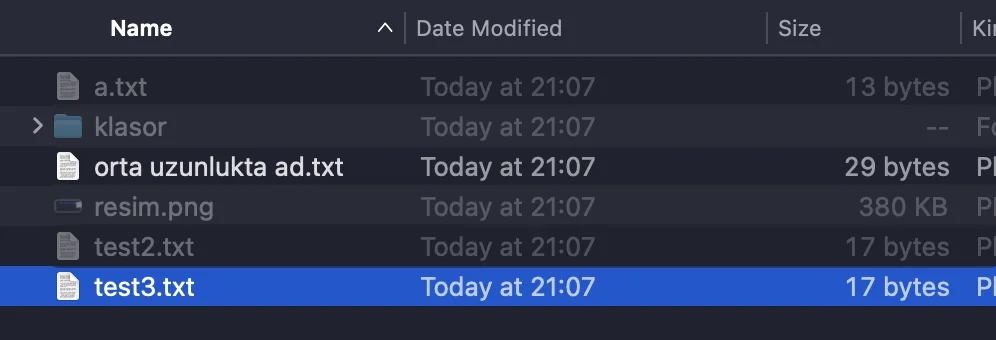



Screenshots of the real app on macOS, in dark appearance. The faded ones are cut; the others are not. On the desktop, a cut file’s icon and name fade the same way.
What it does
Select files, ⌘X, open the destination, ⌘V. Nothing moves until you paste: cut and forget, and no file goes missing.
Just like on Windows, in list, icon, column and gallery views, and on the desktop. You always see what is waiting to move.
Right-click a file and Cut is in the menu. It sits at the very bottom: Finder decides the order of that menu.
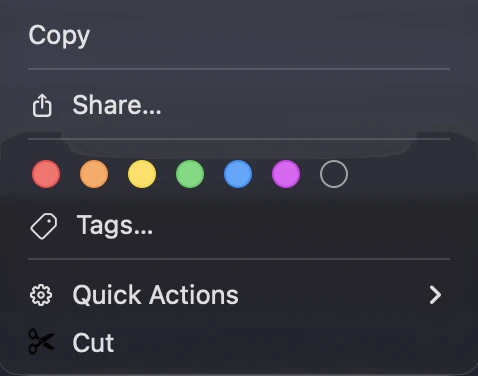
While a cut is waiting, choosing “Paste Item” from the menu moves the files as well.
Its progress window, its question when a name already exists, and ⌘Z to undo all work exactly as before.
While you rename a file or type in a search box, ⌘X cuts text as always.
Press Esc, or copy something else: the cut is cancelled and the files look normal again.
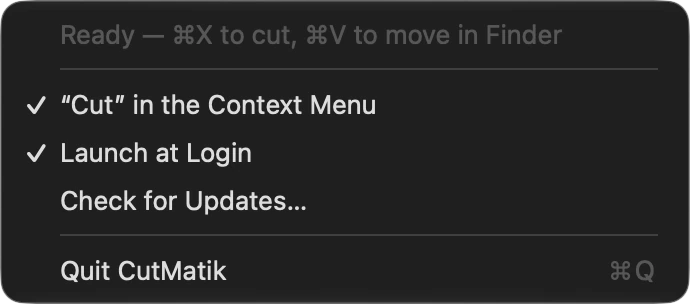
It starts when you log in and sits in the menu bar as a small pair of scissors. Its menu shows the status, has “Cancel Cut” while a cut is waiting, lets you switch the right-click Cut and starting at login on or off, checks for updates, and quits.

Install
Drag CutMatik to Applications and run it. If you open it without dragging, CutMatik offers to move itself to Applications: one click. The first time, macOS asks whether to open an app downloaded from the internet. That is the standard question for every downloaded app: choose Open.
macOS asks for permission. Open System Settings → Privacy & Security and switch CutMatik on. On macOS 27 the section is called Device Control and Data Access; on macOS 26 and earlier it is Accessibility.
“Cut” in the right-click menu and starting at login are set up automatically. You can switch either off from the scissors menu in the menu bar.
To catch ⌘X and ⌘V before they reach Finder. Without it these keys cannot be intercepted, and cut and paste cannot work.
Click the scissors in the menu bar and choose Quit, then drag CutMatik from Applications to the Trash.
It updates itself with one click: when a new version is out it asks once; choose Update and it downloads, installs and restarts.
FAQ
shasum -a 256 ~/Downloads/CutMatik-1.0.1.dmg. For version 1.0.1 it should print 6f6dbbb83c3d06ae1873d12e57dd498093e41b813c37103eb7f28352b76fdd87.CutMatik for Mac. Free. macOS 14 or later.
FreemacOS 14 or laterApple Silicon and IntelVersion 1.0.1Connects only to check for updates

From the same studio